You need to download a piece of software, check your bank balance, or track a package. You type what you need into Google, hit enter, and click the very first link that pops up. It’s a reflex. We are trained to trust that the top result is the right result.
But if that top link has the little bold “Sponsored” tag next to it, you might be walking right into a trap.
Here is a hard truth about how the internet works: “Sponsored” doesn’t mean accurate. It means someone paid enough money to get their website in front of your eyes. Google’s top sponsored spots go to the highest bidder. While Google tries to police its ads, cybercriminals have figured out how to game the system. For the average web surfer, clicking those sponsored links is becoming an increasingly dangerous gamble. Here is why you should always scroll past the ads and go straight for the real results.
1. You Are Clicking on Who Paid the Most, Not Who is the Best
We like to think that search engines give us the most relevant, safe, and helpful information at the very top. But an ad is an ad. When a result says “Sponsored,” that company (or scammer) bought their way to the top of your screen. They didn’t earn that spot by having the best product or the safest website; they earned it with a credit card. By clicking it, you bypass the “organic” search results—the websites that Google’s algorithm actually determined are the most helpful and accurate for your specific question.
2. The Rise of “Malvertising”
Hackers take advantage of the fact that anyone can buy a Google Ad. They pay search engines to put their fake links at the very top of your search results, bidding on keywords for popular brands, software, or even government services like the USPS. Because we naturally trust the top result, we click it. Instead of taking you to the legitimate website you were looking for, that ad redirects you straight into the arms of a scammer.
3. The “Lookalike” Trap
When you click a malicious sponsored link, you are often taken to a landing page that is a pixel-perfect clone of the real website. The logo, the colors, and the login boxes all look identical to the actual service you are trying to reach. But the moment you type in your username and password, you aren’t logging in—you are handing your credentials directly to a cybercriminal who just paid a few dollars to steal your identity.
How to Protect Yourself
The good news is that protecting yourself is incredibly simple, and it doesn’t require you to be a tech genius. You just need to tweak your browsing habits and get the right tools.
1 – Scroll past the ads
Make it a hard rule to entirely ignore any search result with the “Sponsored” label. Always scroll down to the first “organic” (unpaid) result.
2 – Bookmark your favorites
If there is a site you log into frequently—like your bank, your email, or your work portal—bookmark it. Don’t rely on a Google search to get you there every time.
3 – Get PC Matic’s Ad Blocker
One of the easiest ways to protect yourself is to remove the temptation to click altogether. The PC Matic Ad Blocker is designed specifically to keep you safe from fraudulent websites and online scams. It analyzes potential threats in real-time, identifying and blocking scam-related content before it reaches your screen. You can easily install it as an extension on Chrome, Firefox, or Edge. Once the green PC Matic shield is active in your browser, you can surf with peace of mind knowing deceptive ads and scams are being filtered out. (You can learn how to easily install it here).
Step-by-step instructions on how to install the ad-blocker:
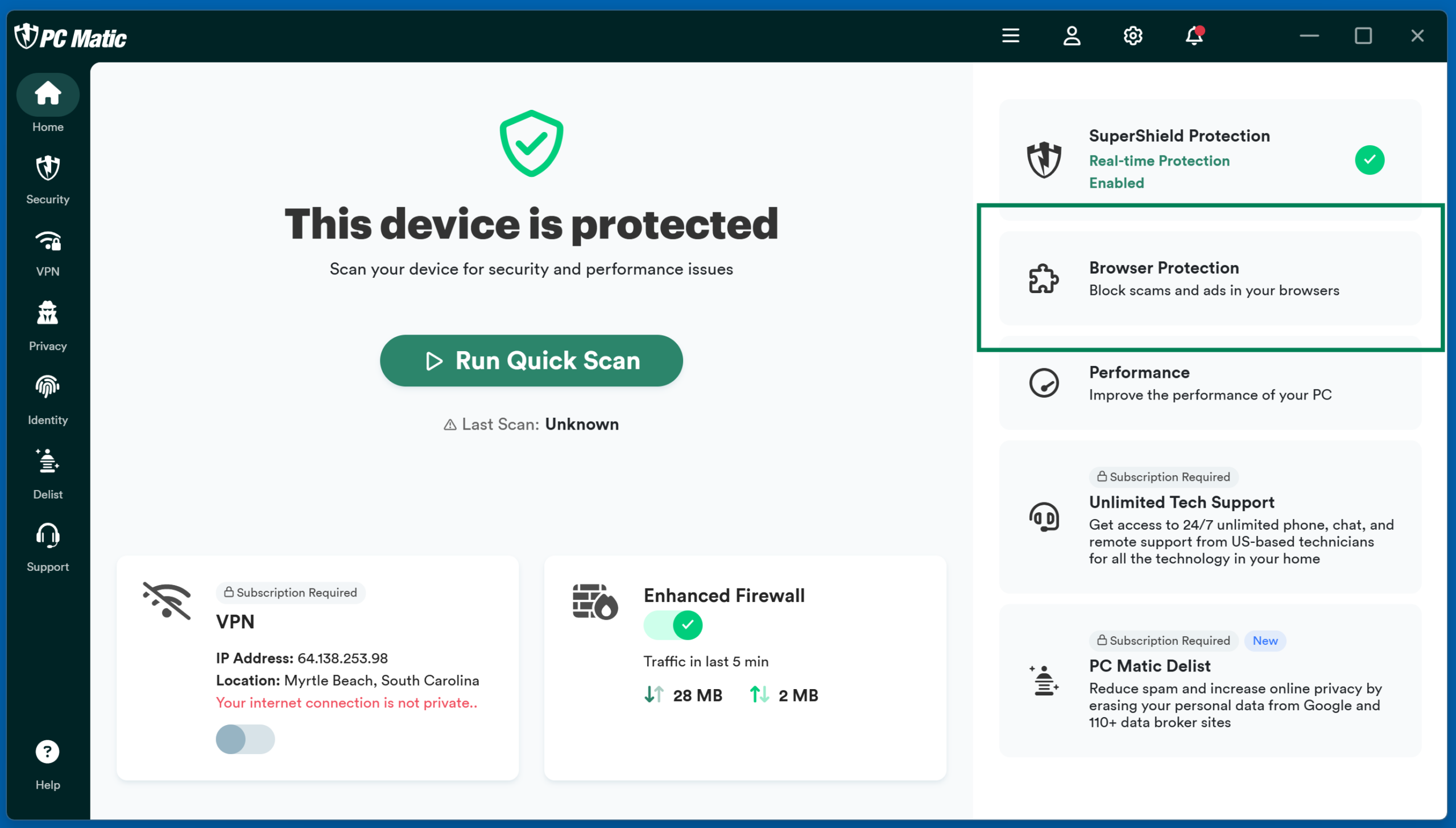
To install the Ad Blocker on any of the supported browsers, open the PC Matic program and click the “Ad Blocker” button.
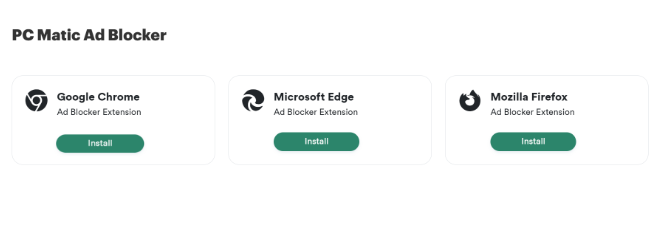
Click the Install button associated with the browser you normally use when accessing the internet.
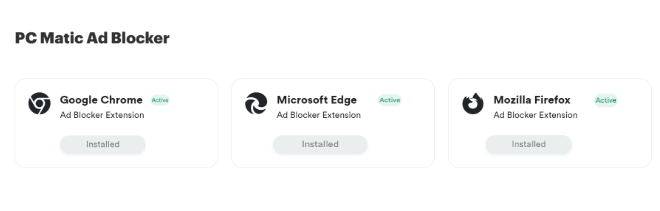
If you see Installed and Active attached to the browser you normally use, PC Matic Ad Blocker is already running.
Your click is valuable. Don’t give it to the highest bidder—especially when that bidder might be a hacker in disguise. Take the extra half-second to scroll down to the real results, and let tools like PC Matic handle the rest. Your digital security is worth it.