It’s a statistic that sounds like a joke, but the punchline is a security nightmare. After decades of cybersecurity training, relentless warnings, and increasingly complex password policies, the most common stolen passwords in 2025 were still “123456”, “admin”, and “password”.
This isn’t a guess. It is the hard reality revealed by a new analysis of over 6 billion leaked credentials discovered in 2025. The data proves a troubling truth: user behavior is stagnant. Despite the rising threat landscape, the human element of security remains dangerously predictable. But for enterprises, this isn’t just about lazy employees—it’s a systemic vulnerability that attackers are ruthlessly exploiting.
The Enterprise Risk: It’s Not Just Personal Accounts
When we see “123456” topping the charts, it’s easy to dismiss it as a consumer problem—someone securing their Netflix account with a throwaway code. But the analysis paints a much darker picture for businesses.
The persistence of passwords like “admin”, “root”, and “user” points directly to a massive enterprise blind spot: default credentials.
These generic logins are often left unchanged on networking equipment, IoT devices, and Industrial Control Systems (ICS). They are the “keys under the doormat” that organizations forget about. If left unsecured, these default credentials give attackers easy, trusted access to critical infrastructure.
Once inside, attackers don’t just sit there. They use these footholds to pivot. Malware-stolen credentials are frequently reused to breach Active Directory (AD), VPNs, and cloud identities. In effect, a lazy password on a minor device can grant an attacker “trusted access” to your entire corporate network.
The Malware Connection: Stolen, Not Guessed
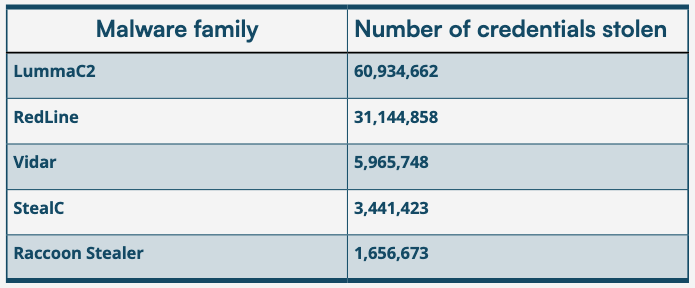
Here is where the threat evolves. Many of these 6 billion credentials weren’t guessed by a brute-force script—they were stolen directly from users’ machines by infostealer malware.
The report identifies Lumma and RedLine as the most active malware families harvesting these credentials in 2025. These stealers run quietly in the background, scraping saved login data from browsers and system files.
This highlights a critical failure in traditional detection-based security. If an infostealer is allowed to run, it doesn’t matter how complex the password is—the malware captures it the moment it’s typed or saved. This is why PC Matic Application Allowlisting is non-negotiable. By adopting a default-deny approach, you ensure that unauthorized programs like Lumma or RedLine cannot execute, stopping the theft before it happens.
Why “Phishing-Resistant” Isn’t a Silver Bullet
Many IT leaders believe they have solved this problem with modern Multi-Factor Authentication (MFA). While phishing-resistant MFA is essential, it is not a cure-all.
The analysis warns that even in secure environments, weak passwords persist in the shadows:
- Legacy Systems: Older applications that don’t support modern MFA often rely on static passwords.
- Service Accounts: Non-human accounts used for automation frequently utilize static, high-privilege credentials (often set to “admin”) that are rarely rotated.
- Directory-Based Authentication: If an attacker compromises a directory admin password, they can bypass MFA entirely.
Attackers are water; they flow to the lowest point. If your front door has a biometric lock but your service entrance uses “password123”, you are exposed.
Actionable Steps for IT Leaders
We cannot wait for user behavior to change. Security teams must take proactive control of the environment.
- Audit Default Credentials: immediately scan your network for hardware, IoT, and ICS devices running factory-default logins. Change them today.
- Block Weak Patterns: Configure your Identity Provider (IdP) to reject passwords containing terms like “Welcome”, “Summer”, Company Name, or “Password”.
- Layer Your Defense: Do not rely on one lock. Implement continuous monitoring for compromised credentials and enforce phishing-resistant MFA on all high-risk access points.
- Stop the Stealers: The best password policy in the world won’t stop a keylogger. Use PC Matic’s application allowlisting to prevent infostealer malware from ever running on your endpoints.
User behavior is hard to change, but your security posture isn’t. You can’t rely on every employee to choose the perfect password every time, but you can choose a security stack that covers their mistakes.
Don’t leave your network open to “123456”. Secure your endpoints with PC Matic today.