My Account
HOME CUSTOMERS Manage Account Add a Device Download PC Matic
BUSINESS CUSTOMERS Business Login
Company
PC MATIC About Us Careers Industry Recognition Leadership
STAY UP-TO-DATE Events TechTalk Podcast Commercials
Blog
Contact Us
CUSTOMER SUPPORT Home Support Business Support
CONTACT SALES Talk to Sales
For Home
Antivirus Security
PC Matic Complete Security Award-winning protection from modern security threats, VPN wifi security, PC performance optimization and more.
PC Matic VPN Cutting-edge Virtual Private Network that keeps your information private.
Products
Antivirus PC Matic VPN Identity Protection PC Matic Privacy Support Unlimited
Threat Awareness
How PC Matic Protects You SuperShield Allowlist
For Business
Business Protection
PC Matic Pro Proactive security and remote management for advanced cyber threats.
PC Matic for SMB Simple & efficient American-made cybersecurity for small and medium-sized businesses.
Solutions
Allowlisting Script Enforcement Device Control Patch Management Remote Tools Integrations Server Security
Learn More
Resellers Affiliates Resources Case Studies
For Federal
Partners
Partner Programs
Managed Service Providers Offer simple & efficient application allowlisting with zero contracts or minimums.
Channel Partners Lets deliver next level, zero trust endpoint protection that people and organizations need, together.
Explore Partnerships
Affiliate Partners
Resources
Resources
Resource Center The best source for case studies, reports, data sheets and all of the latest digital content from PC Matic.
PC Matic Blog Stay up-to-date with the latest news around cybersecurity, scam alerts, helpful tips and more.
Knowledge Resources
Case Studies Data Sheets User Guides White Papers
Blog Resources
Business Security Home Security Cyber News Scam Alerts
Support
Customer Service
Home Support The only place for PC Matic home customers to get trusted technical support.
Business Support Premiere support for business, government, enterprise and education customers.
Learn More
Getting Started Knowledgebase Tech Support Scams Fake Virus Scam The Cyber Scam Report Town Hall Sessions
Security Tools
Password Generator Internet Speed Test What Is My IP?
Company
PC Matic
About PC Matic Learn more about how we began, and our mission to change the security industry.
Careers Grow with us and experience great employee benefits in a work from home environment.
Learn More
Industry Recognition Leadership Commercials
Stay Up-to-Date
Newsroom Blog Events TechTalk Podcast
My Account
Home Customers
My Account Add a Device Renew Subscription Download PC Matic
Business Customers
Business Login Business Support
Buy Now Buy Now Buy Now
Safe + Secure
PC Matic Complete Security
Products
Antivirus
PC Matic VPN
Identity Protection
PC Matic Privacy
Support Unlimited
Threat Awareness
How PC Matic Protects You
SuperShield Allowlist
Business Protection
PC Matic Pro
PC Matic for SMB
Solutions
Allowlisting
Script Enforcement
Device Control
Patch Management
Remote Tools
Integrations
Server Security
Learn More
Resellers
Affiliates
Resources
Case Studies
For Federal
Partner Programs
Managed Service Providers
Channel Partners
Affiliate Partners
Resource Center
All Resources
Case Studies
Data Sheets
User Guides
White Papers
Blog Resources
PC Matic Blog
Business Security
Home Security
Cyber News
Scam Alerts
Customer Service
Home Support
Business Support
Learn More
Getting Started
Knowledgebase
Tech Support Scams
Fake Virus Scams
The Cyber Scam Report
Town Hall Sessions
Tools & More
Password Generator
Internet Speed Test
What Is My IP?
PC Matic
About
Careers
Learn More
Industry Recognition
Leadership
Commercials
Stay Up-to-Date
Newsroom
Blog
Events
TechTalk Podcast
Home Customers
My Account
PC Matic App
Add a Device
Renew Subscription
Business Customers
Business Login
Business Support
Skip to content
  • Blog
  • Categories
    • Home Security
    • Business Security
    • How To
    • CyberSafe Tips & Tricks
    • CyberNews
    • Scam Alert
  • Inside PC Matic
    • Inside PC Matic
    • Awards & Recognition
    • Press Releases
    • Product Updates
  • Blog
  • Categories
    • Home Security
    • Business Security
    • How To
    • CyberSafe Tips & Tricks
    • CyberNews
    • Scam Alert
  • Inside PC Matic
    • Inside PC Matic
    • Awards & Recognition
    • Press Releases
    • Product Updates
Search
  • Language
    • English
    • Portuguese (BR)
  • Language
    • English
    • Portuguese (BR)

How to Follow PC Pitstop on Twitter

  • September 20, 2010
  • PC Matic Cybersecurity

What is Twitter and Why Should You Care?

Twitter is a social networking and micro-blogging service that allows you to send short 140 character messages or ‘tweets’ to groups of people all at once. Those who read your tweets are your ‘followers’.

Twitter also allows you to build groups of other Twitter account users that you would like to ‘follow’. The ‘tweets’ of those you follow – appear on your Twitter home page. The tweets that appear on your homepage become like your own personal newspaper with headlines about topics that are important to you – and you receive these in real time.

Step 1: Register for a Free Account

Register for a Free Twitter account at twitter.com

When registering it is usually best to use your real name – this will make it easier for your friends to find you.

You can interact with your Twitter account with your PC. However, you also have the option to connect your Twitter account to your mobile phone and/or your IM account.

Step 2: Start Following

Following someone on Twitter means you their updates will appear on your Twitter homepage. When you follow PC Pitstop, you will receive our updates on your homepage each time you log in.

Once logged into your Twitter account, you can also search for other users you would like to follow. Simply click on the Find People text link at the top right.


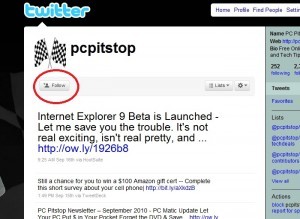
Once you land on the PC Pitstop Twitter page or any other Twitter page – subscribing to Tweets is as easy as clicking the Follow button at the top left of that page.

Step 3: Start Tweeting

When you are ready to begin sharing your thoughts on Twitter – the process is very simple.

Log in to your Twitter account and type your tweet into the ‘Whats Happening’ box at the the top of your Twitter screen and click the Tweet button.


Keep in mind, tweets need to be 140 characters or less.

More Great Twitter Resources

Twitter 101

CNET Guide to Twitter

Stop Responding to Threats.
Prevent Them.

Get Protected

Want to get monthly tips & tricks?

Subscribe to our newsletter to get cybersecurity tips & tricks and stay up to date with the constantly evolving world of cybersecurity.

Related Articles

Unmasking Cybercrime: Insider Stories from Law Enforcement

In a recent and enlightening discussion, retired FBI Special Agent Scott Augenbaum and active duty police officer Marc Evans shared their extensive experiences and insights

Read More
July 31, 2024

Understanding the Evolution of Cybersecurity Advocacy and Education: A Conversation with a Leading Expert

In a recent in-depth discussion, a renowned cybersecurity expert, Dr. Arun Vishwanath with the Cyber Hygiene Academy, shared insights into the evolution of his career

Read More
July 30, 2024

Why an IT Pro Will Never Answer Another Call From ‘His’ Bank

A Day Like Any Other It was a typical morning for Travis. He had just logged into a major upgrade meeting with his team when

Read More
July 22, 2024
For Home PC Matic Home Security Support Unlimited
For Business PC Matic Pro PC Matic MSP
Support Home Support Business Support
Partner Programs Become a Partner Affiliates
Company About Careers Industry Recognition Newsroom Blog
Sign-Up For Our Newsletter

© PC Matic, Inc.
All Rights Reserved.

PC Matic, Inc. BBB Business Review
Choose Region
United States Brazil
EULA Privacy Policy Terms & Conditions PC Matic Pro EULA PC Matic Pro Privacy Policy