Tech support scams are all over. One of the most popular are scams occurring includes cyber criminals posing as Microsoft’s technical support. This isn’t a new scam, but remains widely used.
Microsoft BSoD Support Scams
For those who are unaware, the Microsoft BSoD (Blue Screen of Death) tech support scam is a screen that takes over your PC, stating there are issues and you need to call a toll-free number for support. See the example below: 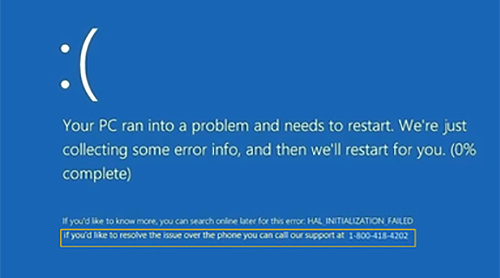 To be clear, this is only one example, therefore there could be several variations of this screen. It should also be known, that this malicious BSoD is an exact replication of a legitimate Microsoft BSoD. The only, and most critical difference, is the last line boxed above.
Microsoft will never provide a support phone number on these screens. NEVER. If you see a support number, then you should automatically know it is a scam.
If you find yourself being baited by hackers with this screen, follow these steps:
- Try to open Task Manager (ctrl+alt+delete)
- If you are able to open Task Manager, click on your browser (Edge, Chrome, Internet Explorer, etc.) and click “End Task”.
- This should resolve the issue. If it does, run a scan of your security solution to ensure the infection is removed.
- If this is unsuccessful, move on to instructions below.
- Some of these scams disable the Task Manager, so if you cannot open it, try restarting your computer.
- If the problem persists, and you are able to access your Control Panel follow the following directions:
- From the Control Panel, click on “System and Security”.
- Click on “System”.
- Click on “System Protection”.
- By clicking on “System Restore”, you will be able to restore your PC to a previous time – prior to this infection.
- If the problem persists, and you are able to access your Control Panel follow the following directions:
Please stay safe, and always remember–Microsoft will NEVER have a support number in any BSoD screen!!