

My Account
HOME CUSTOMERS Manage Account Add a Device Download PC Matic
BUSINESS CUSTOMERS Business Login
Company
PC MATIC About Us Careers Industry Recognition Leadership
STAY UP-TO-DATE Events TechTalk Podcast Commercials
Blog
Contact Us
CUSTOMER SUPPORT Home Support Business Support
CONTACT SALES Talk to Sales
For Home
Antivirus Security
PC Matic Complete Security Award-winning protection from modern security threats, VPN wifi security, PC performance optimization and more.
PC Matic VPN Cutting-edge Virtual Private Network that keeps your information private.
Products
Antivirus PC Matic VPN Identity Protection PC Matic Privacy Support Unlimited
Threat Awareness
How PC Matic Protects You SuperShield Allowlist
For Business
Business Protection
PC Matic Pro Proactive security and remote management for advanced cyber threats.
PC Matic for SMB Simple & efficient American-made cybersecurity for small and medium-sized businesses.
Solutions
Allowlisting Script Enforcement Device Control Patch Management Remote Tools Integrations Server Security
Learn More
Resellers Affiliates Resources Case Studies
For Federal
Partners
Partner Programs
Managed Service Providers Offer simple & efficient application allowlisting with zero contracts or minimums.
Channel Partners Lets deliver next level, zero trust endpoint protection that people and organizations need, together.
Explore Partnerships
Affiliate Partners
Resources
Resources
Resource Center The best source for case studies, reports, data sheets and all of the latest digital content from PC Matic.
PC Matic Blog Stay up-to-date with the latest news around cybersecurity, scam alerts, helpful tips and more.
Knowledge Resources
Case Studies Data Sheets User Guides White Papers
Blog Resources
Business Security Home Security Cyber News Scam Alerts
Support
Customer Service
Home Support The only place for PC Matic home customers to get trusted technical support.
Business Support Premiere support for business, government, enterprise and education customers.
Learn More
Getting Started Knowledgebase Tech Support Scams Fake Virus Scam The Cyber Scam Report Town Hall Sessions
Security Tools
Password Generator Internet Speed Test What Is My IP?
Company
PC Matic
About PC Matic Learn more about how we began, and our mission to change the security industry.
Careers Grow with us and experience great employee benefits in a work from home environment.
Learn More
Industry Recognition Leadership Commercials
Stay Up-to-Date
Newsroom Blog Events TechTalk Podcast
My Account
Home Customers
My Account Add a Device Renew Subscription Download PC Matic
Business Customers
Business Login Business Support
Buy Now Buy Now Buy Now
Safe + Secure
PC Matic Complete Security
Products
Antivirus
PC Matic VPN
Identity Protection
PC Matic Privacy
Support Unlimited
Threat Awareness
How PC Matic Protects You
SuperShield Allowlist
Business Protection
PC Matic Pro
PC Matic for SMB
Solutions
Allowlisting
Script Enforcement
Device Control
Patch Management
Remote Tools
Integrations
Server Security
Learn More
Resellers
Affiliates
Resources
Case Studies
For Federal
Partner Programs
Managed Service Providers
Channel Partners
Affiliate Partners
Resource Center
All Resources
Case Studies
Data Sheets
User Guides
White Papers
Blog Resources
PC Matic Blog
Business Security
Home Security
Cyber News
Scam Alerts
Customer Service
Home Support
Business Support
Learn More
Getting Started
Knowledgebase
Tech Support Scams
Fake Virus Scams
The Cyber Scam Report
Town Hall Sessions
Tools & More
Password Generator
Internet Speed Test
What Is My IP?
PC Matic
About
Careers
Learn More
Industry Recognition
Leadership
Commercials
Stay Up-to-Date
Newsroom
Blog
Events
TechTalk Podcast
Home Customers
My Account
PC Matic App
Add a Device
Renew Subscription
Business Customers
Business Login
Business Support
Skip to content
  • Blog
  • Categories
    • Home Security
    • Business Security
    • How To
    • CyberSafe Tips & Tricks
    • CyberNews
    • Scam Alert
  • Inside PC Matic
    • Inside PC Matic
    • Awards & Recognition
    • Press Releases
    • Product Updates
  • Blog
  • Categories
    • Home Security
    • Business Security
    • How To
    • CyberSafe Tips & Tricks
    • CyberNews
    • Scam Alert
  • Inside PC Matic
    • Inside PC Matic
    • Awards & Recognition
    • Press Releases
    • Product Updates
Search
  • Language
    • English
    • Portuguese (BR)
  • Language
    • English
    • Portuguese (BR)

Strengthen Your Windows Login Security

  • March 26, 2013
  • thewindowsclub

By Anand Khanse for The Windows Club

Strengthen Your Windows Login Security

To protect your computer from unauthorized use, Windows provides a facility to protect it using a password. A strong password is thus the first line of defense as far as your computers security is concerned.

If you wish to enhance the security of your Windows computer, you can strengthen the Windows Login Password Policy using the built-in Local Security Policy or Secpol.msc. Nested among its many settings is a useful set of options that will allow you to configure the Password Policy for your computer.

Windows Login Password Policy

To open and use the Local Security Policy open Run, type secpol.msc and hit Enter. In the left pane, click on Account Policies > Password Policy. In the right pane you see settings for configuring the Password Policy.

secpol-passwords


These are some parameters that you can configure. Double click on each to open their Properties box. From the drop-down menu you can choose and select the desired option. Once you have set them, do not forget to click on Apply/OK.

Enforce Password History

Using this policy, you can ensure that users do not use old passwords again and again after a while. This setting determines the number of unique new passwords that have to be associated with a user account before an old password can be reused. You can set any value between. The default is 24 on domain controllers and 0 on stand-alone servers.
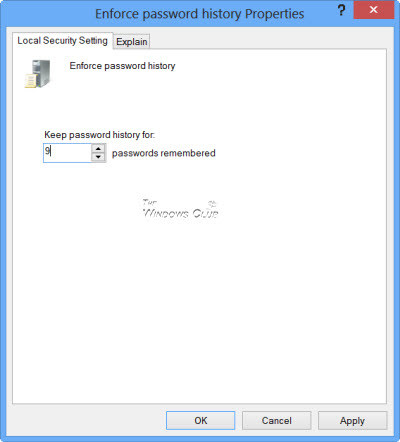
Enforce-Password-History


Article continued here

This excerpt appears with the permission of The Windows Club.
Stop Responding to Threats.
Prevent Them.

Get Protected

Want to get monthly tips & tricks?

Subscribe to our newsletter to get cybersecurity tips & tricks and stay up to date with the constantly evolving world of cybersecurity.

Related Articles

Windows 10 – Limited Network Connectivity

How to troubleshoot network connectivity in Windows 10.

Read More
November 23, 2015

Windows 10 Run Box Alternative

How to use the Explorer address bar as a Run box in Windows 10.

Read More
November 17, 2015

Does New Hardware Require a New Win10 License

Be aware of the possible Windows 10 license implications of upgrading hardware in your PC.

Read More
October 6, 2015
For Home PC Matic Home Security Support Unlimited
For Business PC Matic Pro PC Matic MSP
Support Home Support Business Support
Partner Programs Become a Partner Affiliates
Company About Careers Industry Recognition Newsroom Blog
Sign-Up For Our Newsletter

© PC Matic, Inc.
All Rights Reserved.

PC Matic, Inc. BBB Business Review
Choose Region
United States Brazil
EULA Privacy Policy Terms & Conditions PC Matic Pro EULA PC Matic Pro Privacy Policy